Appearance
Browser Bridge
The bridge is a userscript that sends your current song from supported music websites to Rate My Music: Remake.
Use this if you want the game to read music directly from your browser, supporting faster and moer accurate detection.
Install Tampermonkey
Tampermonkey is the browser extension that runs userscripts.
Install it for your browser:
- Chrome: https://www.tampermonkey.net/?browser=chrome
- Edge: https://www.tampermonkey.net/?browser=edge
- Firefox: https://www.tampermonkey.net/?browser=firefox
After installing it, you should see the Tampermonkey icon in your browser extensions.
Enable Userscripts
If you are using Chrome, Edge, or any other Chromium based browsers (Brave, etc), then you will have to enable Userscripts.
First, navigate to your extensions page (Extensions icon - Manage extensions on Chrome)
Locate Tampermonkey, then click Details. 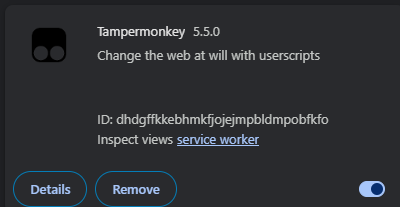
Scroll until you see the Allow User Scripts option, then click to enable it. 
Install the Rate My Music: Remake userscript
Open the userscript install page:
Click Install this script.
Tampermonkey will open a new page showing the script. Click Install.
Open a supported music site
The bridge supports sites like:
- Spotify
- YouTube
- YouTube Music
- SoundCloud
- Apple Music
- Deezer
- Tidal
- Amazon Music
- Audiomack
- Bandcamp
Now, you have to link your game to your browser. To do this, click the cog icon at the bottom right of your music player. 
From here, you have to enter your details, as in your Roblox UserID, and the security key the game gives you. 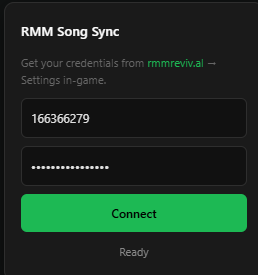
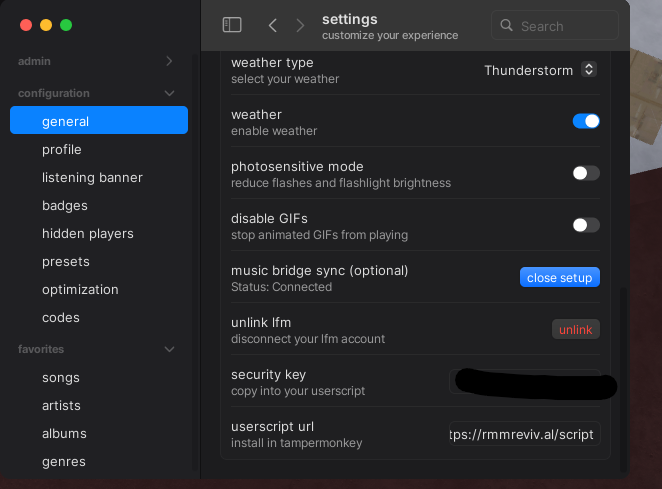
Once you paste in your information, click Connect.
Check that it is working
You should recieve a notification stating "Synchronization is now active!" when you do it properly. If you don't see this notification, it might still be linked, which you could tell by pausing your song, and seeing if the game pauses with it.
If neither work:
- Refresh the music website.
- Make sure Tampermonkey is enabled.
- Make sure the userscript is enabled.
- Try playing a different song.
TIP
Keep the music tab open while you play. The bridge reads the active music page from your browser.