
Appearance
Web Scrobbler
Web Scrobbler is a browser extension that sends music from supported websites to Last.fm.
Install the extension
Install Web Scrobbler for your browser:
- Chrome: https://chromewebstore.google.com/detail/web-scrobbler/hhinaapppaileiechjoiifaancjggfjm
- Firefox: https://addons.mozilla.org/firefox/addon/web-scrobbler/
- Edge: https://microsoftedge.microsoft.com/addons/detail/web-scrobbler/obiekdelghebnifnaffgfgjmpehhjjlq
Connect Last.fm
Press the extensions icon on your browser, then click the three lines next to Web Scrobbler, then Options. 
You would next go to Accounts, located at the top left, the press Sign in under Last.fm. 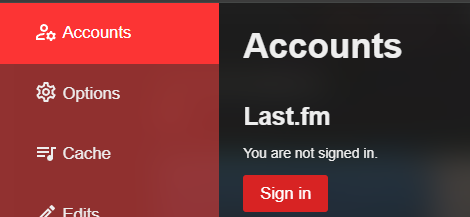
After you log in, follow the next steps.
Play music
Open the website you use for music, then play a song.
You should then get a notification on your screen, indicating that it was detected.
Check Last.fm
Go to your Last.fm profile and make sure the song appears under recent tracks.
Enter your username in game
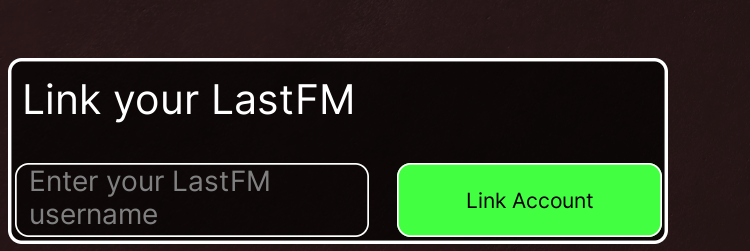
Enter your Last.fm username in game. Your current music should show shortly after.
TIP
If music is not showing, make sure Web Scrobbler is installed properly, and that you are connected via Last.fm